


You opened your broker statement expecting to see ten shares. It shows two shares and a $30 credit. Before you spend the cash or change your portfolio totals, look for the line that explains both entries. In this example, the company combined its shares and the broker paid out the fraction.
That one statement makes a better test of a stock portfolio tracker than a screen full of familiar tickers. Can you tell what you own, where the cash went and how the event fits into your wider finances? Here’s how to work through it with your broker’s records and Bluwhale.
Stock portfolio tracker evaluation checklist
- Pick a holding you recognize and open the broker statement for the date you want to check.
- Find one event that changed the share count or cash balance. Read its description before deciding what the change means.
- Trace the result to its destination. Cash can stay at the broker, buy more shares or arrive in a connected bank account. Each leaves a different record.
Why did ten shares become two shares and $30?
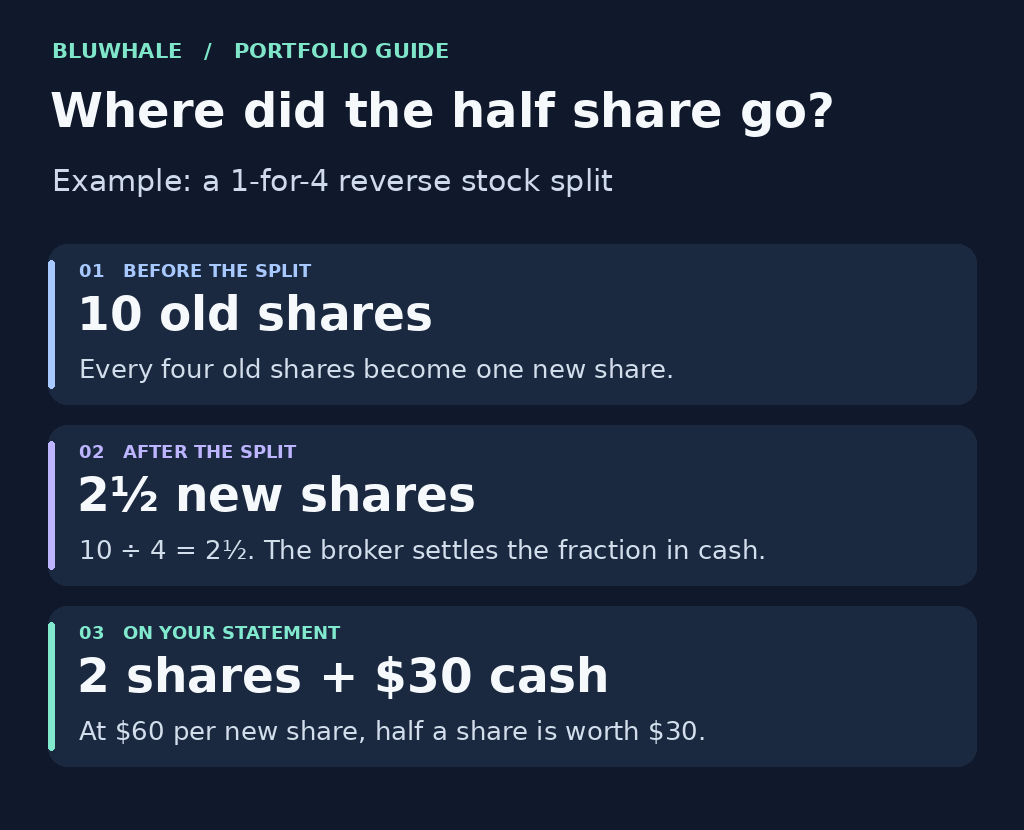
In a 1-for-4 reverse split, every four old shares become one new share. Ten old shares therefore give you two whole new shares and half of another. In our example, the broker settles that half share in cash at $60 per new share. Half of $60 is $30.
What to look for on your statement
Look for two whole shares in your holdings and a $30 credit in the brokerage cash balance. The credit may be labeled cash in lieu. At the example price, the two shares are worth $120. Add the $30 credit and you have $150 in total. If your stock portfolio tracker shows 2.5 shares and $30 after settlement, it has counted the fraction twice.
For your own stock, use the split ratio, settlement price and treatment of fractions in the corporate-action notice. Terms vary by issuer. Investor.gov explains how reverse stock splits work.
Where does that $30 fit in your Bluwhale profile?
Bluwhale for Individuals brings bank accounts, cards, exchanges and wallets into one financial profile. Your broker statement tells you why the $30 appeared. Your connected bank balance helps answer a different question: has that cash arrived in the account you use to pay bills?
If the $30 is still at the broker, leave it there in your review. If you later withdraw it, match the withdrawal to the deposit in your bank. Across those accounts, it’s the same $30. Use Bluwhale’s portfolio tracker guide when you want to bring holdings and cash together, and WhaleScore when you want to review your broader financial health. For the return on that particular stock, use its prices, income and costs over the period you held it.
If you use a Bluwhale agent to review cash across accounts, give it a specific question: “Which connected account received the withdrawal?” Keep the broker’s split notice for the share calculation. You choose which financial data the agent can access in Bluwhale and review any proposed action separately.
A dividend and a split leave different clues
A dividend puts income in the account. If you receive $20 and keep it in cash, look for a single credit. If the $20 is reinvested at $40 a share with no fees, look for the purchase of 0.5 shares. Counting the new shares and treating the $20 as still available would overstate your balance.
A two-for-one split changes the units you own. Ten shares worth $40 each become twenty worth $20 each at the split-adjusted price. Both add up to $400 before other price moves. Keep that distinction in mind when you review a change in allocation alongside your Bluwhale accounts. FINRA’s guide to investment returns walks through the role of dividends and costs.
What if the same shares appear in two accounts?
Suppose you move five shares from one broker to another. The receiving account may show them before the old account updates. Check the security, quantity and transfer dates on both statements. Once both sides settle, you still own five shares across the two accounts. There is no second purchase to enter.
If the accounts use different currencies, compare the number of shares first. Then check the exchange rate and date behind each reported value. This separates a currency difference from a missing holding.
Can you explain the balance a month later?
Keep the statement and the split notice together. If you export a tracker report, open the file and find the event date, final share count and cash credit. Those three details should let you explain the $150 without digging through your email again. For a closer look at what a file retains, use these investment software export checks.
Finish in Bluwhale with the question that matters to you. If you want to understand this week’s spending money, check the bank account that will cover it. If you want to understand your allocation, look at the position alongside the rest of your assets. For a practical way to connect those views, read why bank and crypto holdings belong in one financial view.