


Last month you bought ten shares. This month your spreadsheet says you own twenty. Before looking for a second trade, check the dates on the two files you downloaded. If both cover the day you bought the shares, the same purchase may have found its way into your total twice.
Good investment tracking software makes it possible to trace a balance back to the records behind it. With Bluwhale, that habit matters beyond the brokerage account: a change in your connected financial picture might come from a deposit, a price move or an account you just added. Each calls for a different follow-up.
Investment tracking software features and privacy
Choose one holding you know well. Get the statement that shows its purchase and the most recent statement that covers the same account. Before sharing either file, look at what it contains. The account label, trade reference, instrument, quantity and currency are useful for matching a purchase. Your mailing address and full account number add little to that task.
What one purchase looks like on two statements
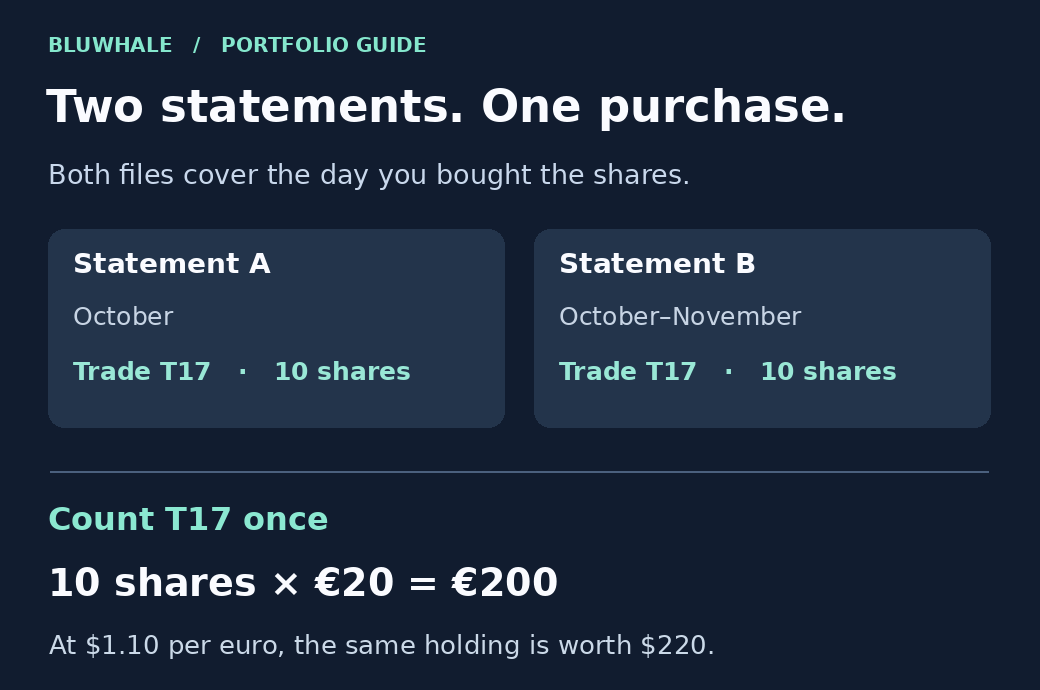
In this example, the October statement lists trade T17. A second file covers October and November, so T17 appears again. Both refer to the same ten shares in the same account. Keep both files as references and count the purchase once.
Which account changed in Bluwhale?
Bluwhale for Individuals brings bank accounts, cards, exchanges and wallets into one financial profile. Suppose you move $500 from your bank to your exchange. The exchange balance rises, but the money came from another account you own. Look at the bank withdrawal and the exchange deposit together before interpreting the increase as a gain. Account separately for any fees.
WhaleScore gives you a view of financial health across your connected profile. To explain what happened to one investment, go back to its quantity, price and cash movements. If you ask a Bluwhale agent to help with the review, choose the accounts relevant to that question. A difference between two balances is a reason to investigate the records before authorizing any action.
Is it a duplicate or a second purchase?
A matching date and amount are clues. The account and trade reference are stronger evidence. If the second file also lists T18 for ten shares at the same price, look for the second confirmation. Two trades at the same price can be genuine. Two copies of T17 in the same account describe one purchase.
Use that distinction when comparing a connected feed with a statement. Transactions can be revised or canceled after they first appear. Plaid’s investment data guide explains how its holdings and transaction updates work. Keep the date of each source so you can tell an old record from a later correction.
Check what happens when the account refreshes
If you correct a transfer that was labeled as income, reopen the report after its next refresh. The label should explain where the money came from. The total cash held across the two accounts should still reconcile to the statements. If the entry reverts, keep the original reference and correction together so you know what needs attention next month.
Can you explain the dollar value from the export?
Use the ten shares in the illustration. At €20 each, their value is €200. At $1.10 per euro, that is $220. If a report shows $440, check the quantity first. If the report still shows ten shares but the dollar total differs slightly, check the price date and exchange rate. Those two discrepancies have different explanations.
What will someone see in a file you share?
Open a sample export outside the investment tracking software. Can you find the account alias, trade reference, quantity, currency and reporting date? Next, look for details you didn’t intend to share, including other accounts, free-text notes and identifying information. A field hidden on the dashboard can still appear in a downloaded file.
Bluwhale lets you choose which agents and partners can access your connected data. Choose access for the job at hand. To discuss whether two records refer to one holding, share only the relevant account context. For how Bluwhale handles personal data and requests about it, see the privacy policy.
Questions about using Bluwhale for portfolio tracking
My balance went up after I connected another account. Did I earn that money?
First compare the accounts included on each date. Adding a wallet you already owned brings an existing balance into your Bluwhale profile. To measure what changed over the month, compare the same accounts at both dates and separate new deposits from changes in asset prices.
Should I check WhaleScore or my broker statement when a holding looks wrong?
Start with the statement. It identifies the shares, transaction date and trade reference behind the holding. Once you can explain the number, return to WhaleScore in Bluwhale for the broader question of how your finances are doing across connected accounts.
What does a Bluwhale agent need to help me review a transfer?
Start with the sending and receiving accounts, the dates, amount, currency and any fee. That gives you a focused question: “Do these records explain the change between my two accounts?” You control the financial data you share with the agent. Reviewing a past transfer requires no permission to initiate a new one.
For your next review, open Bluwhale’s portfolio tracker guide and pick a balance you can explain from its source. If your money spans traditional and digital accounts, read why bank and crypto holdings belong in one view.