


Explore exchange-related wallet activity with Bluwhale and make incoming, outgoing and internal movements easier to understand. Cross-Chain Portfolio brings AI wallet analysis into the same ecosystem as your financial profile and specialist agents. Start your exchange inflow tracker workflow with a public address and network, then focus on the exchange, token and period that matter to your research. Whether you follow USDC movements or compare activity around related wallets, Bluwhale helps you keep the analysis connected to a clear financial objective.
Sign in to Bluwhale and open Cross-Chain Portfolio. Bring the public address, network and exchange-flow question you want to explore.
Exchange inflow tracker: start with the right wallets
An exchange may use several addresses for deposits, withdrawals and operational activity. Grouping the relevant wallets gives an exchange inflow tracker a useful boundary for the review. Bluwhale’s wallet workflow connects the public address with its network, so you can concentrate on the activity you want to understand. Name the token and period you care about, then use the agent to explore that wallet context. This keeps the exchange-related review focused and easy to continue.
A useful review might follow USDC movements around a deposit address or compare activity around two related wallets. Include the exchange label or address list you are using, so the same context carries through the analysis. Focus on the practical outcome: understanding the direction of movements, recognizing an operational transfer or putting a large transaction into context. Bluwhale’s agent interface lets you develop that research around the specific wallets you are reviewing.
Separate incoming, outgoing and internal movements
Three categories make exchange wallet activity easier to read: funds entering the selected group, funds leaving it and transfers between its own addresses. Exchange wallet inflows describe value crossing into the group. Exchange wallet outflows describe value leaving it. Internal exchange transfers help explain how funds move within the group. Bringing these categories into your Bluwhale conversation gives a simple structure to a topic that can otherwise feel like a long list of transactions.
The distinction matters because a large transfer between operational wallets tells a different story from a deposit into the group. An exchange inflow tracker should keep those movements separate and make the period clear. You can then follow up on the part that interests you: a particular address, a change in direction or the relationship between incoming and outgoing amounts. Bluwhale helps you keep the wallet question connected to the wider financial context as you explore.
A simple exchange-flow example
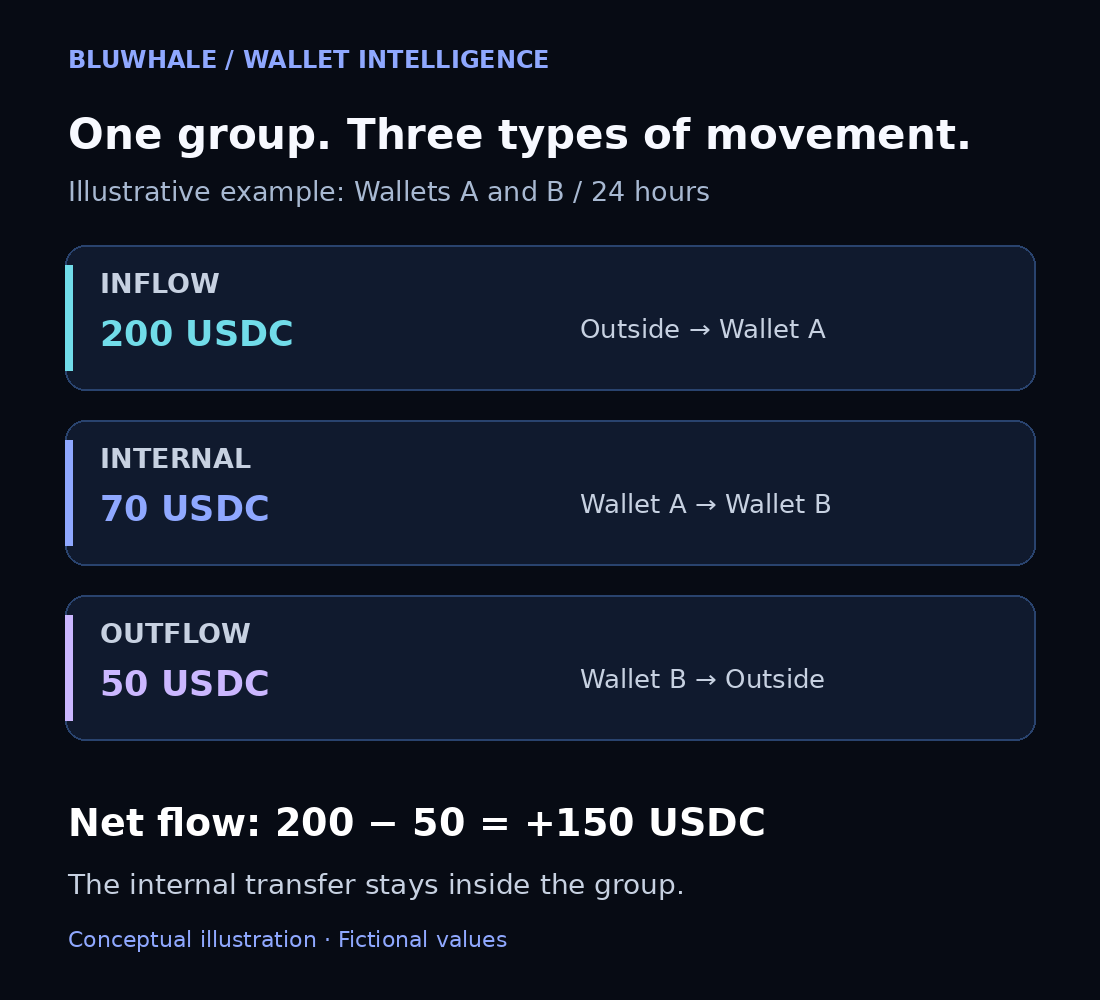
For this exchange inflow tracker example, consider an illustrative exchange address group containing Wallet A and Wallet B during one 24-hour period. The following fictional USDC figures explain the calculation and are presented as a teaching example.
An outside address sends 120 USDC to Wallet A. Another outside address sends 80 USDC to Wallet A. Wallet A then sends 70 USDC to Wallet B. Finally, Wallet B sends 50 USDC to an outside address. The group receives 200 USDC from outside and sends 50 USDC out. Its net flow is positive 150 USDC: incoming funds of 200 minus outgoing funds of 50.
The 70 USDC movement stays inside the group, so it belongs in the internal category. Keeping it separate makes the summary much easier to understand. This is the kind of distinction to bring into an exchange-related wallet conversation in Bluwhale: what came in, what went out and what simply moved within the selected group. One clear calculation can turn several movements into a useful overview.
A fixed wallet group helps an exchange inflow tracker keep its movement categories consistent. Use the same address boundary when comparing one period with another, and keep the token consistent so differences reflect activity rather than a change in scope. In Bluwhale, carry that scope into each follow-up to connect the selected movements with the financial question you want to answer.
Turn wallet activity into a useful conversation
Use Bluwhale’s AI interface to focus on exchange-wallet activity. Explore an address, organize the token and network context, and continue with a focused analysis of the activity that matters to you. For exchange-related research, useful questions concern the direction of movements, their timing and how related wallets fit together. The benefit is a simpler way to work through the information while keeping the original research objective in view.
Take the review further by comparing the same asset across periods, examining a particular movement or adding a related wallet. You can also ask for a simpler explanation when the activity becomes difficult to follow. Keep the exchange, network and token consistent throughout your exchange inflow tracker workflow in Bluwhale. This makes your follow-ups more useful and helps turn a collection of wallet movements into an organized view of exchange-related activity.
Build a clearer picture of exchange activity
An exchange inflow tracker adds wallet-flow context to exchange research. Deposits, withdrawals and operational movements each contribute a different part of the picture. A transfer describes the movement of an asset, while the purpose of that movement is a separate question. Keeping that distinction simple helps you use the activity intelligently and choose a useful next question in Bluwhale.
Bluwhale connects this research with a wider financial picture. Its platform brings banks, wallets and exchange accounts into a unified financial profile, with specialist agents for different tasks. Use the exchange-flow review for the question at hand, then explore your crypto portfolio or another financial view when you need broader context. That connection makes the wallet analysis useful beyond a single transaction.
Continue your wallet research in Bluwhale
Continue your exchange inflow tracker review with the Bluwhale crypto wallet tracker. Open Cross-Chain Portfolio, enter the public address and network, and focus the analysis on the movements that matter to you. From a token-specific review to a wider crypto portfolio perspective, Bluwhale connects wallet research with a unified financial experience. Choose the period you want to understand and continue with the wallet agent.
Open wallet analysis in Bluwhale
Exchange inflow tracker questions
What is an exchange wallet inflow?
An exchange wallet inflow is a transfer into the address or address group associated with the exchange in your review. When using an exchange inflow tracker in Bluwhale, keep that boundary attached to the token and period being analyzed. Compare incoming and outgoing movements across the same boundary; net flow is the incoming amount minus the outgoing amount.
How are internal transfers treated in exchange-wallet flow analysis?
Transfers between two addresses inside the selected exchange group belong in the internal category. Bluwhale wallet analysis is easier to interpret when internal exchange transfers stay distinct from funds entering or leaving that group. For example, a movement from Wallet A to Wallet B changes the location of funds inside the group without becoming an additional external inflow or outflow.
How do I start exchange-related wallet research in Bluwhale?
Open Cross-Chain Portfolio in Bluwhale and sign in to start the exchange inflow tracker review. Bring a public address, its network and the exchange-flow question you want to explore. Define the asset and period, then ask focused follow-up questions about incoming activity, outgoing activity or relationships between the addresses included in the selected group.
What inputs does an exchange inflow tracker need?
Bring the public address or address list, network, exchange label, asset and observation period. Bluwhale’s Cross-Chain Portfolio uses the address and network to frame wallet analysis, while the additional context gives your exchange question a clear scope. Keep the same group boundary when comparing periods so a change in the address list does not get mistaken for a change in activity.
What can Bluwhale help me understand about exchange wallet movements?
Bluwhale helps you develop a focused analysis of the direction, timing and financial context of the wallet movements you select. Use the exchange inflow tracker approach to separate exchange wallet inflows from exchange wallet outflows and internal movements. Continue with a particular transaction, related address or different period when that follow-up helps explain the financial question that brought you to the agent.
How does an exchange-flow review connect with my broader finances?
Continue from the exchange inflow tracker review into Bluwhale’s broader financial profile, dashboard and specialist agents. The Bluwhale crypto wallet tracker is the parent route for a wider address-analysis question, while the financial dashboard connects wallet activity with other accounts. This gives you a practical next step: understand the exchange-related movements first, then explore the wider financial view when your question expands.