

Bluwhale nodes give individuals a way to participate in the network, with setup and reward tracking available through its node and profile experiences. This guide walks through choosing a node, preparing for setup and following your participation status.
Explore Bluwhale nodes
Start at the official Bluwhale node platform. Review the available node types and the details shown for each option, including price, participation requirements and reward terms.
The platform provides the offer and conditions that apply when you participate. Check those details before making a purchase or connecting a wallet.
Master Nodes and Common Nodes
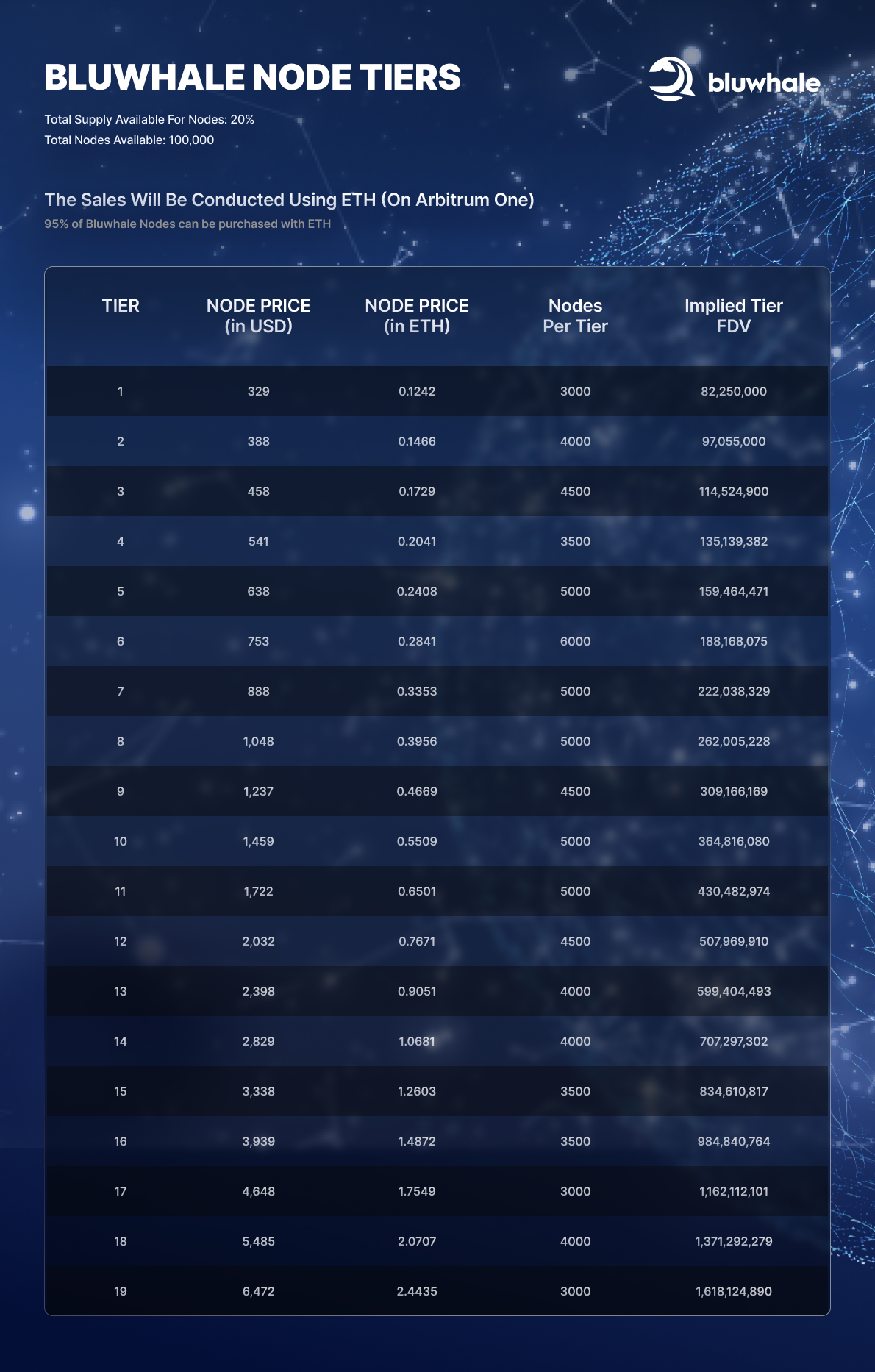
Bluwhale's node materials distinguish Master Nodes and Common Nodes. Compare the options available in the official interface to understand how their pricing, participation features and reward conditions differ.
- Availability: check which node type and sale tier are open.
- Setup: review the account, device and activation steps for that type.
- Rewards: read the participation conditions and how reward status is displayed.
- Community features: check whether a particular option includes additional participation or referral features.
Before purchasing a node
- Open the official node platform and select an available node type.
- Review the price, quantity, supported payment method and any applicable network fees.
- Read the purchase and participation terms, including eligibility and any refund or referral conditions.
- Connect the account or wallet requested by the interface.
- Review any signature or transaction prompt before confirming.
- Keep the transaction confirmation and check the ownership record shown for your purchase.
Set up and follow your node
Follow the activation and setup instructions for your node type. Check that the purchase is associated with the intended account or wallet, then complete the steps displayed in the node or profile interface.
Once setup is complete, use the platform to follow operational status and reward progress. Ownership, activation and reward claiming are separate steps, so review each status as you move through the process.
Device and operating requirements
Bluwhale's mobile-node approach is designed to make participation easier to manage. Before setup, review the supported device, connection and operating requirements for the node you selected.
Use the instructions provided with that node type for activation and ongoing operation. If the platform asks for an additional setup step, complete it before relying on an active status.
Understanding reward status
Bluwhale's node platform presents BLUAI rewards and tracking. Check the reward unit, participation conditions and status shown in your account.
A pending, allocated, claimable or claimed amount represents a different stage. Any vesting or release conditions determine when an allocation becomes available. Token rewards do not represent a fixed cash value or a guaranteed return.
If a reward estimate or calculator is available, review its assumptions. Actual outcomes depend on the program terms and the factors described there.
Eligibility and participation terms
Review the requirements for purchase, operation and reward claims. A campaign or node program may specify identity verification, geographic eligibility or a claim period. Follow the conditions shown for your participation.
Offers and referrals
If you use a referral, rebate or refund offer, read its conditions before proceeding. Keep a record of the applicable terms and your transaction so that you can follow up on a program-specific question.
Checking common issues
- Purchase not visible: confirm the purchase wallet, network, transaction status and account.
- Node not active: revisit the setup and activation steps for your node type.
- Reward not claimable: check participation status, eligibility, verification and claim timing.
- Wallet prompt unclear: pause and verify the requested action through the official interface before approving it.
When requesting support, provide the relevant transaction reference, node type and error message. Never share a seed phrase or private key.